 Renew Before It Lapses
Move
Moving a domain to another registrar
Last reviewed
The short version
- You're allowed to move a domain to another registrar.
- You need an auth code from the old registrar, and the transfer lock has to be off.
- It usually takes about five days. Near expiry it can take longer.
- Start well before the end date. And renew first if it's close.
You're allowed to move
You aren't stuck with the registrar you started with. ICANN's transfer policy says registered name holders must be able to move their registrations between registrars.[1] A transfer changes who looks after the name. The name itself stays the same.
The steps
Here's the usual order. Each registrar's screens look different, but the steps match.
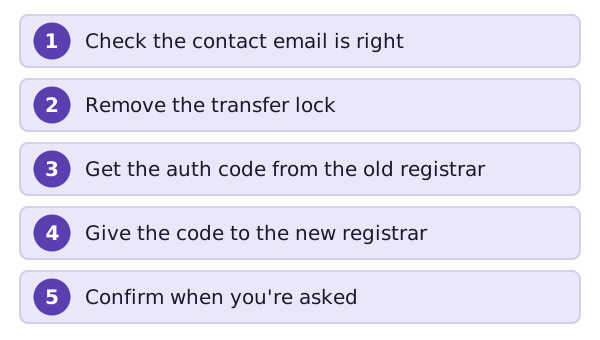
1. Check the contact email. The new registrar needs the name holder's go-ahead. That request may go by email to the addresses in the public record.[2] If the address is wrong, the email never arrives.
2. Remove the transfer lock. A registrar can lock a name against transfers when it's registered, or when you ask.[1] You have to remove any such lock first.[2] The locks page explains what that lock is.
3. Get the auth code. An auth code (short for authorisation code) is a code from your old registrar. The new registrar asks for it. It shows you're the one who can move the name.
4. Give the code to the new registrar. It starts the transfer using the code.[2]
5. Confirm. You may get an email to approve. Do it quickly. Then wait.
If your registrar doesn't let you manage these yourself, there's a safety net. It must give you the code and remove the lock within five calendar days of your request.[1]
How long it takes
The process may take about five days.[2] That's the normal case.
Near the end date, things can go wrong. A transfer can take up to 14 days in some cases. The registration may run out before it finishes.[2]
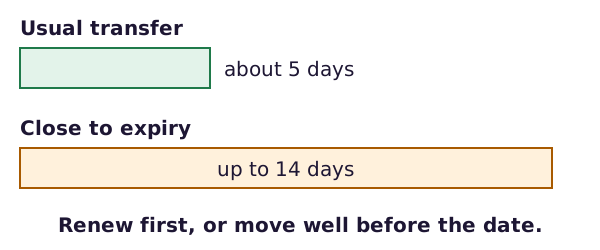
So there are two safe choices. Move well before the end date. Or renew first, then move.[2]
When a transfer can be refused
The old registrar can only say no for specific reasons.[1] Two common ones:
- Unpaid fees. The policy lists no payment for the previous registration period.[1]
- A new name. A transfer can be refused if the name was registered less than 60 days ago.[1]
The same wait applies after a transfer. The domain can't move again for 60 days, except back to the previous registrar.[2]
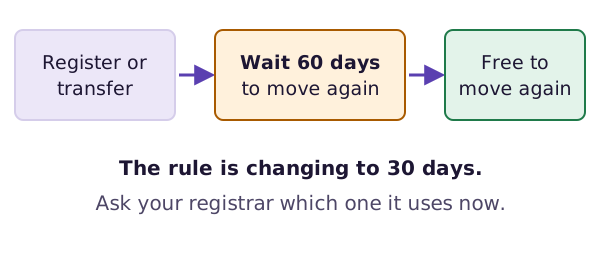
That 60-day rule is changing. At a meeting in March 2025, ICANN agreed to replace it with a 30-day lock for new registrations and transfers. It takes effect after it has been put in place, within 18 months.[2] Your registrar knows which wait it uses today.
What next
You may have noticed a few words in this page that come from a public record. The next page shows how to look up that record yourself.
Sources
- Transfer Policy, ICANN (accessed 2026-10-26)
- Domain name registrar, Wikipedia (accessed 2026-10-26)