 Renew Before It Lapses
Expire
What happens when a domain expires
Last reviewed
The short version
- On expiry day, the name stops being safely yours.
- The registrar can switch your site off, and for the last stretch it must.
- You can usually still renew for a while. But the registrar may delete the name at any time.
- Don't plan around a grace period. Renew before the date.
What an expired domain is
A domain expires when the term you paid for runs out and nobody renews it. The record is still there. But the paid-up time is over.
The rules below come from ICANN's policy for generic names such as .com. The policy calls the person who could renew just before expiry the Registrant at Expiration.[1] That's usually you.
What changes on the day
Your registrar has to pause your site and anything else that uses the name. In technical terms, it must interrupt the domain's path in the DNS (the address book of the internet).
How soon depends on when the registrar deletes the name:
- If it deletes within eight days of expiry, the pause runs from the expiry date until deletion.[1]
- If it waits longer, the pause must cover at least the last eight days that you can still renew.[1]
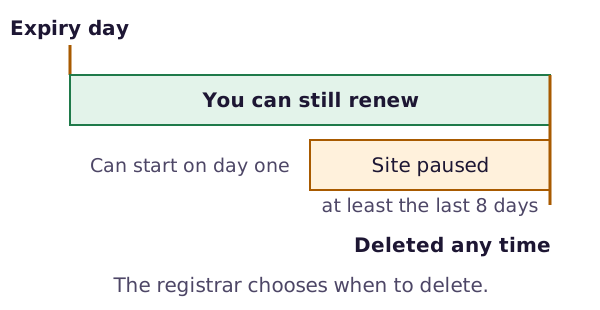
ICANN says a name that is not activated in the DNS "will not resolve".[2] That means a browser can't find your site. Websites and any email addresses that use the name can stop working.
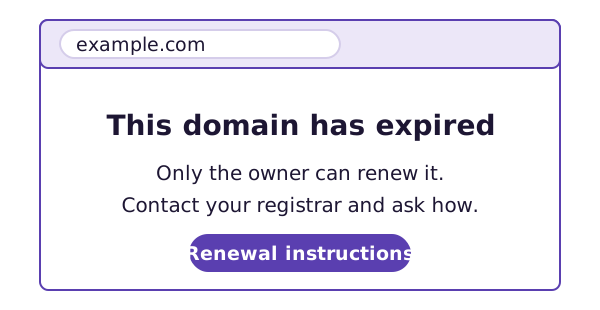
Some registrars show a page instead. If so, the page has to say clearly that the domain has expired and explain how to renew.[1]
Can you still renew?
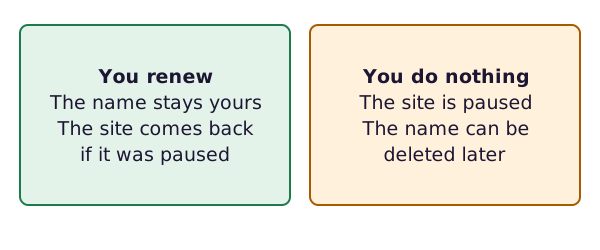
Yes, for a while. The registrar must let the Registrant at Expiration renew an expired name.[1] And once you renew, it has to switch your site's path back on right away, or as soon as it reasonably can.[1]
The catch: there's no promised grace period
Many people hear "grace period" and relax. Here's the trouble. The policy lets registrars delete a name at any time after it expires.[1] No minimum wait is promised.
Some registries do add a short grace period of their own. In one, called the auto-renew period, the registry extends the name for you. If you don't want to keep it, you must tell your registrar quickly.[2] That's a registry rule. It isn't something every name has.
Even when a name hasn't been deleted yet, getting it back can be hard. It can be difficult, expensive or impossible.[3] The name often goes through several stages over months.[3]
So the plan is simple. Renew before the date. Treat any extra time as luck.
What next
If nobody renews and the registrar deletes the name, the story goes on. The next page covers the stages after deletion.
Sources
- Expired Registration Recovery Policy, ICANN (accessed 2026-10-26)
- EPP Status Codes | What Do They Mean, and Why Should I Know?, ICANN (accessed 2026-10-26)
- Domain name registrar, Wikipedia (accessed 2026-10-26)